DJI Mic 2
our rating
4.7
(out of 5)
Specs Snapshot
- Frequency Response – 50 Hz – 20 kHz (low-cut optional at 100 Hz)
- Polar Pattern – Omnidirectional (built-in mic on each transmitter)
- Self-noise – ~21 dBA
- Max SPL– 120 dB
- Weight – TX: 28 g (each); receiver: 28 g; case: case 200g
- Operating Time – Transmitters and Receiver, 6 hours
- Charging Time – Transmitters and Receiver, 70 min; Charging Case, 2h40min
Pros
- 32-bit float internal recording with safety track
- Works intuitively out of the box
- Clean, natural vocal sound with low self-noise
- Intuitive touchscreen scroll wheel receiver
- On-board noise reduction improves intelligibility
- All-in-one metal charging case; up to ~18 hours total runtime
- Plug-and-play with phones, cameras, and computers
Cons
- 2.4 GHz link can drop at long range or in crowded RF areas
- Transmitters are a bit bulky if you want a hidden lapel look
- No lavalier mics included in the box
- Supports only two transmitters (no 3–4 mic expansion)
- Latency ~20 ms, not ideal for real-time vocal monitoring
TL;DR:
This seamless, all-in-one wireless mic setup stands out as one of the better options out there for content creators and podcasters.
Check Price:
Introducing the DJI Mic 2
The DJI Mic 2 is aimed at creators who want quality audio without the bulk or complexity of traditional recording setups. It introduces 32-bit float recording, onboard noise reduction, and a redesigned receiver and charging case compared to the original.
We tested this wireless mic system side-by-side with competitive models to see how it holds up.
For more information on microphones and mic reviews, see our mic category page here. See here for other audio gear reviews.
Test Notes and Methodology on the DJI Mic 2
How We Measured
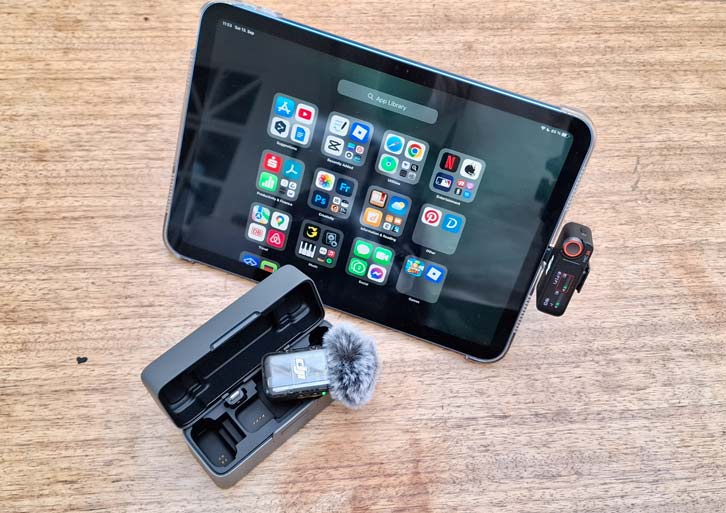
All test recordings were captured using an iPhone 14, Samsung A55, iPad 11, and a Panasonic Lumix S5 camera.
Recording took place in a quiet, untreated room, and in noisier ambient conditions to simulate typical home studio use. This gave us a more complete understanding of how each mic performs in controlled and real-world scenarios.
Test Bench & Environments
Input gain was set to deliver clean recordings, typically peaking around -12 dBFS. No EQ, compression, limiting, or post-processing was applied to any of the audio clips. This ensures that what you hear is the raw, uncolored sound of each microphone.
Gear Purchased by Us
All microphones were purchased independently. We do not accept free gear or promotional samples, and we do not run sponsored reviews. Microphone placement and performance technique were kept as consistent as possible across all tests.
We fully acknowledge that microphone results can vary depending on your room, gear, and technique. Our goal is to provide a reliable, honest reference point to help you make informed decisions.
Sample Recordings
Alternatives to the DJI Mic 2
Rode Wireless Pro
A top relatively affordable pick for high-end video production workflows. It includes 2 lav mics, timecode support, dual-channel recording, and premium accessories

Check Price:
Rode Wireless Go 3
A compact and affordable solution with strong audio quality and 32-bit float recording, ideal for solo creators who want professional results without high-end extras like timecode.

Check Price:
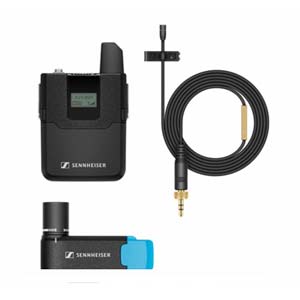
Sennheiser AVX Wireless Microphone System
The most reliable, pro option for wireless lav mics. Fast, no-hassle setup XLR output. Great for film crews and documentary shooters.
Check Price:
Who is this mic for?
The DJI Mic 2 is not a niche tool; it is built for speech-driven content creators who want clarity without needing an audio engineer. Its combination of wireless freedom and onboard backup recording makes it especially useful in situations where quality audio is paramount.
- Podcasters: Perfect for two-person shows. The backup recording on each transmitter means that even if the wireless feed glitches, the episode is still saved. For traveling podcasters, the charging case keeps everything in one small package. No need for an audio interface.
- Streamers: With its consistent pickup and minimal latency, the Mic 2 allows streamers to move, gesture, or even step away from the desk without their audience losing their voice. It integrates seamlessly with capture cards or direct phone setups.
- Filmmakers: Independent shooters and small crews can record clean dialogue on set without hiring a sound operator. At weddings or interviews, the 32-bit float recording protects against unpredictable shouts or whispers.
- Educators and trainers: Teachers, lecturers, and corporate presenters benefit from being able to move naturally in a room without dropping audio. The magnet mounting system makes clipping on fast and simple.
- Content creators on the move: Travel vloggers, documentary shooters, and journalists can use the transmitters as standalone recorders when stealth or backup is critical.
The Mic 2 is aimed at people who want dependable, broadcast-quality sound with minimal setup overhead, rather than professionals managing large-scale productions.
What’s New vs the Original DJI Mic (and Mic Mini)
Design & Case Changes
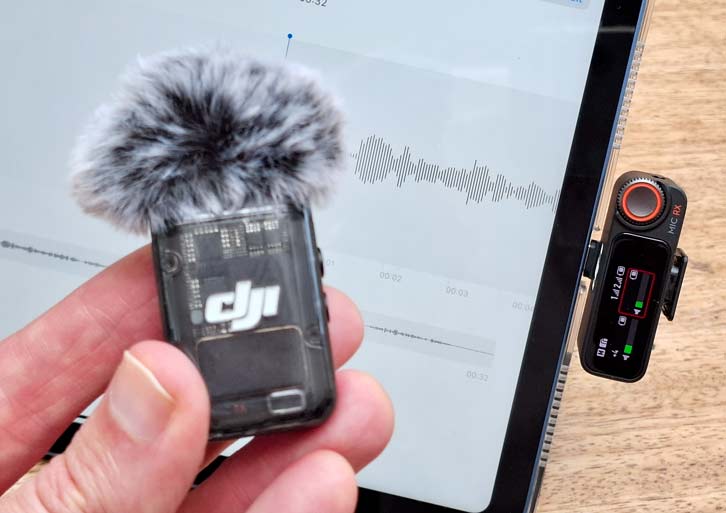
The case has been completely reworked. It now has a metal hinge and tougher outer shell, addressing durability concerns with the plastic hinge on the first generation. Transmitters are shorter and more rounded, making them less intrusive when clipped.
Magnets are stronger and less prone to slipping, and the furry windscreens now twist and lock securely instead of relying on friction fit. For anyone frustrated with the wobbly windscreens of the first model, this is a welcome upgrade.
The Mini, by contrast, lacked a true charging case. That makes the Mic 2 far easier to travel with.
Receiver UI & Controls
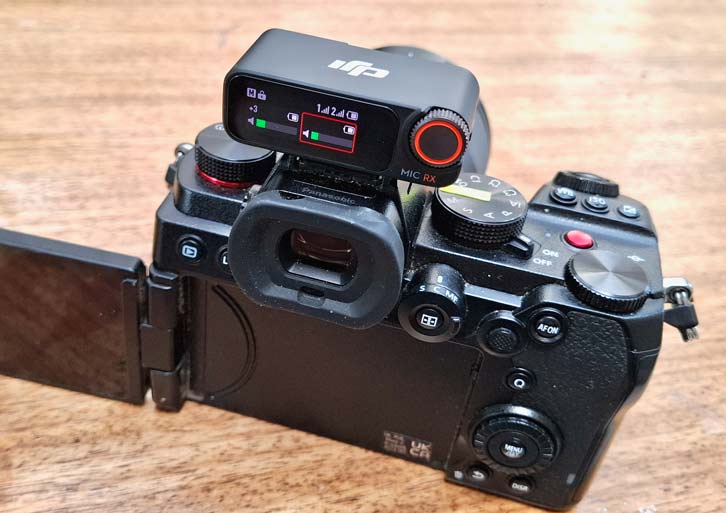
The receiver now blends a touchscreen with a scroll wheel, combining speed with precision. Menus are streamlined, and brightness is sufficient for outdoor shooting.
A headphone jack lets you monitor audio live, and status indicators now show not just battery but also storage levels on each transmitter. The original model lacked these refinements, while the Mini offered no interface at all, relying instead on automatic pairing.
Internal Recording & Safety Options
Each transmitter now records 32-bit float files to its 8 GB of memory. That means loud voices won’t clip, and soft voices can be lifted in post without extra hiss. The Mic 2 also adds dual-channel safety track recording, which outputs a lower-level duplicate for further protection.
By comparison, the first Mic only offered 24-bit recording with fixed gain, and the Mini offered no internal recording, which many professionals considered a dealbreaker.
Noise Reduction / Voice Enhancement
Noise reduction is a key addition. When activated, it reduces steady ambient sounds such as air conditioning, hum, or distant traffic. It won’t eliminate sudden sounds like claps or horns, but it does make voices cut through better in busy spaces.
Neither the original nor the Mini had this function. For solo shooters, this is a real time saver since it makes audio immediately more usable without heavy editing.
Recommended Applications
The DJI Mic 2 is recommended for the following applications:
- Two-person interviews and talk shows
- Vlogging and solo filming
- Teaching, webinars, and live events
- Field recording and discreet backup audio
Check out our gear category page for more on microphones and audio gear.
What’s in the box?
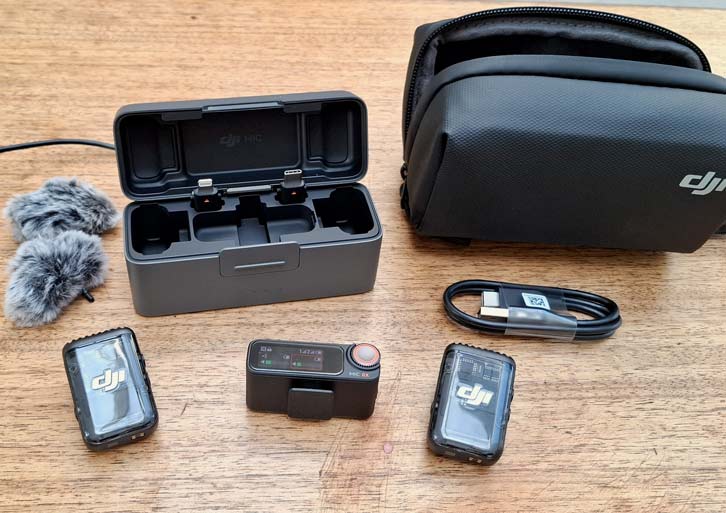
The DJI Mic 2 box arrived with the following:
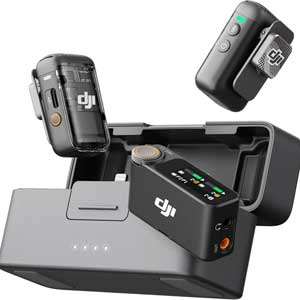
- Charging case (metal) for TX/RX
- 2× transmitters with built-in mics
- 1× receiver with touchscreen scroll wheel
- USB-C and Lightning phone adapters
- 3.5mm TRS cable
- 2× furry windscreens
- 2× spare magnetic clips
- USB-C charging cable
- Soft accessory pouch
Build
Transmitter Mounting, Magnets & Clips
Mounting is now more secure thanks to stronger magnets and redesigned clips. Even on thicker fabrics like jackets, transmitters stay in place.
Compared to traditional alligator clips, this system is faster and less damaging to clothing. The rounded edges reduce snagging, though you still need to place them carefully to avoid rubbing sounds.
Display, Dials & One-Hand Control
The receiver’s bright screen and tactile wheel make it possible to adjust gain or enable safety tracks instantly. Even under pressure, one-hand control is possible.
I liked that all key information — battery levels, gain, storage, pairing — is visible at a glance, reducing stress during live shoots.
Charging Case & Accessories
The charging case extends runtime by two full charges, reaching up to 18 hours total. It holds the receiver, both transmitters, and adapters in neatly arranged slots.
DJI includes USB-C and Lightning adapters, windscreens, magnets, and cables. What you don’t get are lavalier microphones, which the Rode Wireless Pro comes with.
Setup & Compatibility
Phone workflows (USB-C/iPhone/Android)
The receiver connects directly via adapters and routes audio into apps with no configuration. I just loved that I didn’t have to fiddle and it all worked without the need to consult a manual.
Bluetooth works too but disables advanced features like safety track recording. For serious work, stick with adapters.
Camera workflows (3.5mm/USB)
The receiver mounts in a hot shoe and connects via cable. Output can be mono, stereo, or safety track. Adjusting gain at the receiver avoids pushing noisy camera preamps.
Multi-Device Pairing & Switching
Transmitters remain paired even when switching between devices. Moving from a camera to a phone is almost instant. The limitation: only two transmitters can connect, while the DJI Mic 3 allows four.
App/Receiver Settings You Should Change First
- Enable safety track
- Turn on 32-bit float internal recording
- Match receiver output gain to your camera’s input
- Clear transmitter memory before shoots
- Test noise reduction in the shooting environment
Audio Quality — Lab & Field Results
Self-Noise & Frequency Response
The Mic 2 has a very low noise floor. Even in quiet studios, hiss is nearly absent. The frequency response is balanced, with slightly boosted mids and highs that make speech crisp and intelligible. Voices sound natural and need little EQ. I found the quality to be about on par with that of the Rode Wireless Go 3.
Wind Handling (no filter vs windsock vs NR)
- Bare mic: wind noise is overwhelming and ruins takes.
- With furry windsock: cuts most gusts, though low rumble may remain.
- With windsock low-cut filter: excellent results, removing most rumble.
- With windsock low-cut NR: best outcome, producing clean outdoor audio even on breezy days.
This layered defense makes the Mic 2 far more versatile for outdoor vloggers than its predecessor.
Plosives, Clothing Rustle & Off-Axis Voice
Plosives (hard “P” sounds) are minimal due to clip-on distance, and windscreens reduce them further. Clothing rustle is possible, but careful placement solves it. Off-axis performance is strong — voices stay consistent even when turning the head, thanks to the omnidirectional capsule.
Music/Instrument vs Spoken-Word Capture
The DJI Mic 2 is optimized for the spoken word. Acoustic guitar or sung vocals sound shallow and weak compared to studio mics. Spoken word, however, is outstandingly clear, making it ideal for podcasts, interviews, and teaching.
Range, Dropouts & Latency
Line-of-Sight Range (open field)
In open fields, the Mic 2 maintains stable audio to about 150 meters. DJI claims 250 meters, but that requires perfect conditions with no interference. Even when dropouts occur, internal recordings capture a flawless backup.
Urban Interference & Body-Block Tests
In cities, practical range drops to 30–50 meters. Wi-Fi, Bluetooth, and other signals reduce stability. When the signal is blocked by the speaker’s body, dropouts occur. Again, internal recording saves the day by providing a clean local file.
Latency for Live Streaming & Camera Monitoring
Latency measures about 20 ms. For video recording, this is imperceptible. For live monitoring, you can feel a slight delay in your own voice. Streamers usually adapt quickly, but it’s something to note if you monitor heavily.
Battery LIfe & Storage
TX/RX Runtime & Case Top-Ups (measured vs rated)
In our tests, each transmitter ran about 5–6 hours, and the receiver about 5. The charging case delivers two full refills, extending total use to about 18 hours. Fast charging brings units back to full power in roughly an hour, making them ready for another shoot.
On-Device Storage Management & Backup Recording
Each transmitter has 8 GB of storage, holding more than 14 hours of 32-bit float audio. Offloading files via USB is fast, but you must clear space manually. Regular file management ensures you never run out during critical shoots. For professionals, this feature alone makes the DJI Mic 2 worth it.
Controls, Display, & Usability
Touchscreen vs Physical Wheel
The touchscreen allows quick swipes, while the wheel enables precise adjustments. This dual system is faster and less error-prone than touch-only setups. Even with gloves or under bright sun, settings can be adjusted reliably.
Gain Staging, Safety Track & 32-Bit Float Workflow
Best practice is to output strong levels from the receiver and lower camera gain. Safety track recording saves a lower-level duplicate in case of sudden peaks. If everything fails, 32-bit float backups make even clipped or whisper-level recordings salvageable in post.
Noise Reduction & 32-Bit Float
Dialog in Noisy Cafés / Conferences
Noise reduction does a pretty good job cleaning up chatter and mechanical hum. It may slightly thin the voice but makes speech stand out clearly. For teachers and podcasters in uncontrolled spaces, this could be a useful tool.
Outdoor Vlogging with Traffic/Wind
When paired with windscreens, noise reduction suppresses most rumble and low-frequency city noise. Sudden sirens still come through, but the dialogue is much more usable than raw recordings.
Post-Production Tips for Best Results
I would suggest using NR sparingly when ambience is distracting. And always keep safety track files for quick fixes. I also had better results with Normalize on with 32-bit float recordings to maximize clarity without distortion. Together, these tools offer a lot of control from a
Final Thoughts: Is the DJI Mic 2 Worth It?
After testing, I think the DJI Mic 2 remains a dependable, creator-friendly wireless system in 2025. Its headline feature, 32-bit float internal recording, allows you to rescue almost any audio take, no matter how uneven the levels were during capture.
Add a clean, natural sound profile, intuitive controls, and a smart charging case that keeps everything powered and organized, and you have a kit that works with minimal hassle.
It offers quality audio and simplicity on par with rivals like the the Rode Wireless Go 3 and the Sennheiser Profile Wireless (full review) and is more robust and intuitive than budget rivals.
The arrival of the DJI Mic 3 complicates things slightly, since it offers four-channel recording, timecode sync, and expanded memory. But many solo creators, podcasters, educators, and two-person film crews don’t need that added complexity.
For iPhone users, see our buyer’s guide Best Microphones for iPhone for an in-depth comparison of current competitive models.
The Mic 2 balances price, portability, and reliability. Its limitations — two-mic cap, visible transmitters, range that suffers in crowded cities — are real but manageable. For most creators, the Mic 2 is still a smart, professional buy in 2025.
DJI Mic 2
Check Price:
Questions or Comments?
Join the discussion here on Facebook.
FAQ
Is the DJI Mic 2 good for iPhone/USB-C phones?
Yes, it connects directly with adapters and works instantly with apps.
Does 32-bit float mean I can’t clip?
Internal recordings won’t clip, but live wireless output still can if gain is too high.
How far does DJI Mic 2 really reach without dropouts?
Up to 150 meters in open space, or 30–50 meters in urban areas.
Should I buy DJI Mic 2 or Rode Wireless Pro for weddings/interviews?
Mic 2 is simpler and has noise reduction, while Rode includes lavs and timecode.
Is DJI Mic 2 still a smart buy now that Mic 3 exists?
Yes, if you only need two mics and prefer lav input support at a lower cost.
How Do Microphones Work?
For a deeper dive on how microphones work, see our guide 3 Types of Microphones and How They Work.