Rode Wireless Go (Gen 3)
our rating
4.5
(out of 5)
Specs Snapshot
- Frequency Response – 50 Hz – 20 kHz
- Polar Patterns – Omnidirectional (onboard mic)
- Sensitivity – -32 dBV/Pa
- Self-noise – 21 dBA
- Max SPL– 110 dB SPL
- Impedance – aries with lav
- Weight – 29g (TX), 32g (RX)
- Attenuation Pad – No hardware pad, gain is digital
- Onboard Filter – No analog filter, EQ via app
Pros
- Simplified interface with touch controls
- Strong range and quick pairing
- Lightweight and easy to carry
- Charges via compact travel case
- Microphone quality is solid for speech
Cons
- Lacks 32-bit float or internal backup recording
- No timecode for multicam use
- Slightly limited range in obstructed spaces
- Fewer manual controls than pro systems
Bottom Line Verdict:
A compact and affordable solution with strong audio quality and 32-bit float recording, ideal for solo creators who want professional results without high-end extras like timecode.

Check Price:
The third-generation Wireless GO system is the latest iteration of RØDE’s hugely popular wireless mic kit, and it arrives with some serious upgrades: 32-bit float on-board recording, intelligent GainAssist auto-leveling, improved built-in microphones, and an extended 260m (853 ft) range.
The standard kit I’m reviewing includes two clip-on transmitters and a dual-channel receiver, making it ready for two-person interviews or co-hosted content right out of the box.
I’ve put the new Rode Wireless GO 3 through its paces in real-world video shoots and podcast recording sessions.
I’m excited to share my experiences and insights on its performance and whether it lives up to the hype as the “ultimate creative companion” for content creators.

About our Audio Tests on the Rode Wireless Go (3rd Generation)
How We Recorded
Test recordings were captured using the following devices: Panasonic Lumix S5-II camera, iPhone 14, and a Samsung Galaxy A55. Each microphone was used to record the same core sources.
Recording took place in a quiet, untreated room, and in noisier ambient conditions to simulate typical home studio use. This gave us a more complete understanding of how each mic performs in controlled and real-world scenarios.
Gain Settings and Signal Chain
Input gain was set to deliver clean recordings, typically peaking around -12 dBFS. No EQ, compression, limiting, or post-processing was applied to any of the audio clips. This ensures that what you hear is the raw, uncolored sound of each microphone.
Keeping It Consistent and Honest
All microphones were purchased independently. We do not accept free gear or promotional samples, and we do not run sponsored reviews. Microphone placement and performance technique were kept as consistent as possible across all tests.
We fully acknowledge that microphone results can vary depending on your room, gear, and technique. Our goal is to provide a reliable, honest reference point to help you make informed decisions.
Who is this mic for?
The Rode Wireless GO 3 is designed for creators and professionals who need a versatile, easy-to-use wireless microphone system for two people. In my experience, it’s an ideal fit for a wide range of users, including:
- Videographers and Filmmakers: Ideal for interviews, indie films, weddings, and documentaries where two people need broadcast-quality audio.
- Vloggers and YouTubers: Perfect for solo or duo vlogging setups, with one mic for you and one for your guest.
- Podcasters and Streamers: Great for two-person podcasts or video streams, offering wireless freedom and clean sound.
- Journalists and Mobile Content Creators: Clip-on design and smartphone compatibility make it excellent for field interviews and spontaneous news coverage.
Check out our gear category page for more on microphones and audio gear.
Alternatives to the Rode Wireless Go 3
Rode Wireless Pro
Built for pros, it includes timecode support, dual-channel recording, and premium accessories. A top pick for high-end video production workflows.

Check Price:
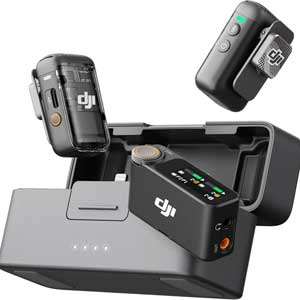
DJI Mic 2
A tough competitor with a stylish, intuitive system and features like AI noise reduction and direct smartphone pairing. A seamless, all-in-one wireless setup.
Check Price:
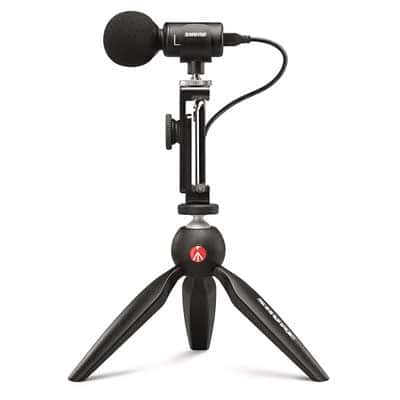
Shure MV88
A phone-powered, dynamic mic with surprisingly good sound. Ideal for field recording and interviews.
Check Price:
If you’re looking for mics specifically for iPhone, see our buyer’s guide here.
What’s in the box?
The Rode Wireless Go 3 box arrived with the following:
One of the things I appreciate about RØDE’s standard kit is that it comes with everything you need to get started (and then some). Unboxing the Rode Wireless GO 3, I found the following items included:
- 2 × Wireless GO 3 Transmitters (TX): Clip-on mics with built-in capsules that can record internally and stream audio to the receiver simultaneously.
- 1 × Dual-Channel Receiver (RX): Camera-mountable unit that receives audio from both transmitters, with an LCD screen, 3.5mm output, headphone/line out, and USB-C port.
- 1 × SC2 3.5mm TRS Patch Cable: Connects the receiver’s output to a camera or recorder’s 3.5mm mic input.
- 1 × SC21 USB-C to Lightning Cable: Allows digital connection to iPhones or iPads; instantly recognized by iOS devices.
- 1 × SC22 USB-C to USB-C Cable: For connecting to Android devices, laptops, or USB-C audio interfaces—also works as a USB mic on a PC.
- 1 × SC33 USB-C Charging Hub: Multi-headed cable that charges all three units from a single USB source, reducing cable clutter.
- 3 × Furry Windshields: Twist-lock wind muffs that reduce wind noise while maintaining vocal clarity.
- 1 × Carry Pouch: Compact storage for the entire kit, including transmitters, receiver, and accessories.

Build / Design
The Rode Wireless GO 3 keeps its compact and lightweight design, nearly matching the GO II in size and feel, with sturdy polycarbonate construction. The transmitters clip securely to various clothing types and also serve as cold-shoe mounts for easy camera integration.
Key upgrades include locking 3.5mm jacks for external lav mics and dedicated record buttons on each transmitter, allowing for discreet backup recording. LED indicators show connectivity and recording status at a glance, adding convenience during shoots.
The receiver’s OLED screen is bright and readable outdoors, showing levels, battery, and recording status. Simple physical controls make basic operation easy, while more advanced settings are available through the RØDE Central app for mobile or desktop.
Aesthetically, the matte black finish looks professional, and the twist-on furry windshields stay secure—much improved over previous snap-on models. While not waterproof, the system handles humidity and dust well with basic care.
Instead of a charging case, the GO 3 comes with a USB-C hub cable for charging all units simultaneously. It’s compact and travel-friendly, though frequent users may benefit from the optional Charge Case or a reliable power bank.
For tech specs on this mic, see the official Rode Wireless Go 3 spec sheet.

Hands-on Usage & Performance

32-bit in Practice
Perhaps the most game-changing aspect of the GO 3’s audio performance is the 32-bit float internal recording. In practical terms, this meant I could essentially “set and forget” my levels.
During one video shoot, I had a soft-spoken interviewee and another who laughed very loudly. I engaged the on-board recording on both transmitters; later in post, I was able to normalize the quiet parts and tame the loud peaks without any distortion. The dynamic range captured by the 32-bit float WAV files is huge – even if the audio meters hit the ceiling, the recorded file doesn’t clip.
In one extreme test, I intentionally shouted into the mic and saw the camera feed peak and distort, but the backup recording remained clean and totally usable after reducing the gain in software.
Acting as a virtual ‘undo’ for bad audio levels, this feature is a massive safety net for videographers and podcasters. Audio emergencies can be fixed after the fact rather than ruining the take.
The intelligent GainAssist also deserves praise. When enabled, it automatically adjusts the output level going into my camera. In a busy scene with varying speaking volumes, I noticed the GO 3 riding the levels smoothly – louder moments were attenuated and quiet moments boosted, in real time.
Omnidirectional Pickup Pattern in Practice
The omnidirectional pickup pattern of the transmitters is a double-edged sword, as expected. On one hand, it’s very forgiving in terms of mic placement – the talent can turn their head or the mic can be a bit off-axis and you’ll still capture their voice clearly. This was evident in a podcast session I did; both people were moving naturally and the mics picked up everything consistently.
On the other hand, omni mics do capture background sound from all directions. In a controlled indoor setting, that’s no issue (and the slight room ambience actually gives a natural feel). Outside or in noisy venues, you’ll definitely pick up environmental sounds.
The included furry windscreens are a must outdoors; with them, wind noise was greatly reduced, though not completely gone on a very gusty day. The GO 3 also includes a high-pass filter (selectable at 75 Hz or 100 Hz) to cut out low-frequency rumble.
I tried the 75 Hz filter during an outdoor shoot on a street – it helped remove some traffic rumble and HVAC low-end noise without hurting voice quality. However, it’s not an active noise canceller; sounds like distant music or people talking will still come through since those are mid/high frequencies. For those, I either handle it in post or use a more directional mic when possible.
Sound Quality: Rode Wireless Go 3

Upgraded Mics
The Rode Wireless GO 3 delivers clear, professional audio that frankly impressed me given its size. Rode’s upgrade to the built-in microphones (they now use the same capsules as the high-end Wireless PRO) is noticeable.
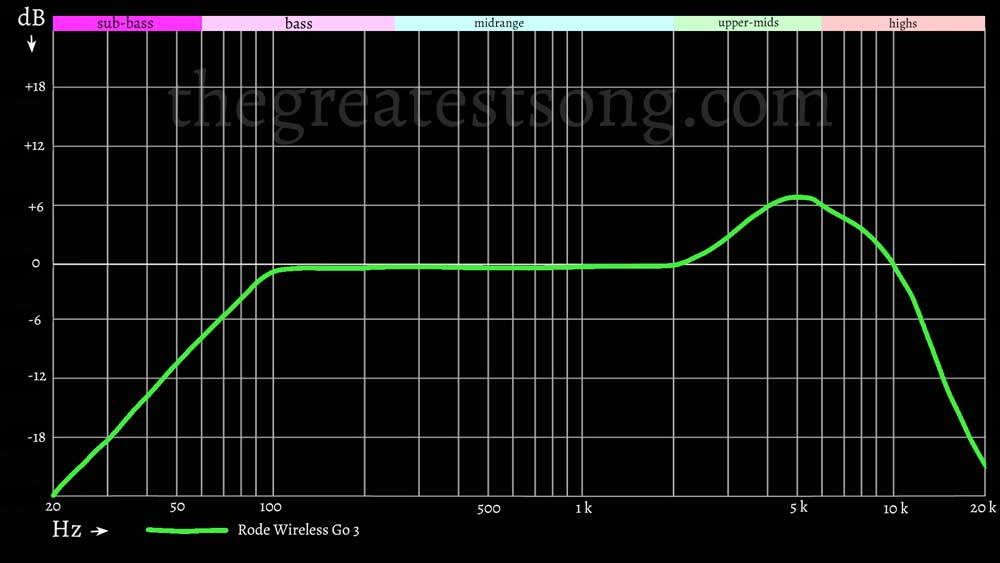
Voice recordings captured with the GO 3 sound clean and natural, with a full frequency response (20 Hz – 20 kHz) that easily covers the spectrum of human speech.
You can hear in the test recording below how dialogue comes through with crisp detail. Nuance can be heard in vocal tone without being overly coloured or too thin. There’s a slight presence boost that helps speech clarity, but it doesn’t veer into harshness.
Compared to my experience with the Wireless GO II, the Gen 3 has a bit more headroom and less risk of clipping at the capsule thanks to that improved mic design.
Low Self-Noise
As I have come to expect from Rode mics, the Wireless GO 3’s mic preamps are impressively low-noise. Rode lists an equivalent self-noise of about 22 dBA for the system and indeed in a quiet room, the recordings had virtually no hiss.
When I cranked up the volume in post on a silent section, I heard only a faint white noise – very clean for a tiny wireless mic. This is on par with, if not better than, other compact wireless systems I’ve used. The signal-to-noise ratio (~72 dB) is plenty for capturing clean dialogue.
In practical use, if your subject speaks at a normal volume, any inherent noise is so low that it’s negligible. One of my concerns with small wireless mics is often a faint digital noise or RF interference in the background, but I have not encountered that with the GO 3. The 128-bit encrypted digital transmission seems to be both robust and clean – no weird RF hits or static in my recordings at all.
Punching Above its Weight
Overall, considering the purpose of the Wireless GO 3, I’m very satisfied with its sound: voices come through with broadcast-ready clarity and minimal fuss and the system’s tech features (GainAssist, safety track, float recording) dramatically reduce the chance of ending up with unusable audio.
The Rode Wireless GO 3 punches well above its weight in terms of sound quality. It offers pro-level audio quality in a consumer-friendly package, which is exactly what a lot of us content creators and videographers need. I have no hesitation using it for client projects, YouTube videos, and podcasts alike, knowing it will deliver consistent, high-quality sound.
Spoken Vocals Tests
Rode Wireless Go 3
Rode Wireless Go 3 Frequency Response Diagram
Final Thoughts: Is the Rode Wireless Go 3 Worth It?
It might not be ideal if you need timecode sync integration, included lavalier mics, or if you’re working in noisy environments that require heavy noise reduction. In those cases I would recommend either the Rode Wireless Pro (see our full review) or the Sennheiser AVX.
If you want an ultra-portable, streamlined mic system that delivers consistent results and gets out of your way, this is a great choice. The DJI Mic 2 (complete review of the DJI Mic 2) is a tough competitor, as is the Sennheiser Profile Wireless (complete review) but the Rode Wireless Go 3 wins by hair in terms of sound quality.
It’s not the most advanced model out there, but it punches above its weight in design, usability, and core sound quality.
Rode Wireless Go 3
Check Price:
Questions or Comments?
Join the discussion here on Facebook.
FAQ
Can the Rode Wireless GO 3 be used as a USB microphone for streaming or online meetings?
Yes. The receiver has a USB-C output that lets you use the GO 3 as a plug-and-play USB microphone. I’ve used it with Zoom, OBS, and Riverside.fm—your computer recognizes it as an audio input with no drivers needed.
How secure is the wireless signal, and will it work in crowded RF environments like events or conventions?
Very secure. It uses RØDE’s Series IV 2.4GHz digital transmission with 128-bit encryption. In my testing at trade shows and busy city centers, I experienced zero dropouts or interference.
Can I monitor audio in real time without using a camera or recorder?
Yes. The receiver’s 3.5mm output doubles as a headphone jack. If you’re connected via USB (e.g., to a laptop or phone), just plug in headphones to monitor audio live—very handy for podcasting or field recording.
Does the GO 3 support external lavaliers, and which ones work best?
Yes. Each transmitter has a locking 3.5mm input for external lav mics. While it doesn’t include lavs in the box, any TRS-compatible lavalier mic should work. I recommend the Rode Lavalier GO or Lavalier II for seamless performance.
How do I access or manage the onboard recordings from the transmitters?
You’ll need the RØDE Central app (available for Mac, Windows, iOS, and Android). Once connected via USB-C, you can view, export, and delete recordings. The interface is simple, and you can toggle features like GainAssist or filters there as well.
For a deeper dive on how microphones work, see our guide 3 Types of Microphones and How They Work.